
API reference
Headers, signature generation, checkout APIs, redirection, webhook and status codes for Hamro Pay Checkout.
1. Headers
Every hamropay api request should include certain headers to work. It is mandatory for all the api.
Following are three headers that the client needs to pass while sending every request. The header includes the following:
- Client Id: The unique id generated for your merchant account. Copy it from UAT Merchant Portal → Client Credentials.
- Client API Key: This is the key to access the API for checkout. Copy it from UAT Merchant Portal → Client Credentials.
- Signature: Every request should have a signature header attached, which is a string value. Every api section describes how to generate the signature string for that api.
Headers Example with Key And Values :
| Header Key (string / text ) | Dummy Values (string / text) |
|---|---|
| Signature | base64stringrepresentation== |
| Client-Id | client@123 |
| Client-API-Key | merchant-api-key-test |
2. Signature Generation
This section describes how the signature string should be generated in general, for the values required for generating the signature please consult every api section found below.
Signature must be included in the header section of the request. To generate a signature we need the signature string (described in the individual API section) and client secret.
The client secret used for generating the string is shown in UAT Merchant Portal → Client Credentials and is shared ONLY between the client and Hamro Pay Checkout API.
The signature should be a Base64 string of HMAC512 message output.
Psudo Code Example:
client_secret = 'abcdefg'

signature_message_string = field1 + ',' + field2 + ',' + field3 + ',' + field4.. fieldn
(String separated by comma).

final_signature_string = toBase64 ( HmacSHA512Digest(signature_message_string, client_secret) )
(Values separated by comma as a string). Messages are different according to APIs. What field's to be used for generating the signature_message are defined in the every API sections.
2.1. Sample Code For Base64 Signature Generation
public static String signHMAC(String message, String secret) {
   try {

       Mac mac = Mac.getInstance("HmacSHA512");
       SecretKeySpec secretKeySpec = new SecretKeySpec(secret.getBytes(), "HmacSHA512");
       mac.init(secretKeySpec);
       return Base64.getEncoder().encodeToString(mac.doFinal(message.getBytes("UTF-8")));

   } catch (NoSuchAlgorithmException var4) {
       throw new RuntimeException(var4);
   } catch (InvalidKeyException var5) {
       throw new RuntimeException(var5);
   } catch (UnsupportedEncodingException var6) {
       throw new RuntimeException(var6);
   }
}
3. Checkout API
{{API_BASE_URL}} and
{{GATEWAY_URL}} are your Hamro Pay UAT
endpoints. Find the exact values in the
Integrate Checkout APIs
step of the checkout quickstart.
3.1. Create Session API
During checkout, the client requests to get the session Id that will be used throughout the checkout cycle. A session ID is a unique identifier that a Hamro Pay server assigns to a single transaction for the duration of the current session. A session is a finite period (around 10 mins) interaction between a web client and server. The session will expire after 10 mins of initial generation.
This API provides the session Id assigned to a specific transaction. All request header required are the same as described in the Header section above.
Intended API User: Merchant backend
Fields required for generating Signature string for Create Session API:
- merchantTxnId
- transactionAmount
- merchantId
- client_id
- clientApiKey
Use these fields for signature string generation i.e values of the fields combined with ',' to form a single string and see Signature Generation section to see how to generate this.
Generation process psudo code example:
initial_signature_string = merchantTxnId+','+transactionAmount+','+merchantId+','+client_id+','+clientApiKey
final_signature_string = toBase64 ( HmacSHA512DigestOf(initial_signature_string, using_secret) )
Request Parameters:
| Fields | Data Type | Description |
|---|---|---|
| merchantTxnId * | String (LESS THAN or EQUAL to 25 characters) | Unique Id. This is the same merchantTxnId used in SigntaureString |
| merchantId * | String | Client’s Hamro Pay Id |
| transactionAmount * | Long | Amount in Paisa. Should be in Range of Rs.10 to Rs.50000. i.e Rs.10 = 1000, Rs.89.92 = 8992 |
| productList | [ OPTIONAL ] List of product’s json (provided below) | List of products contains : name, imageurl, description, price (in Rs) and quantity as provided below in Product List Sample, it will be displayed in the hamropay payment web portal |
| failedRedirectionUrl * | string | Url used to redirect to clients after the transaction is failed from hamropay |
| successRedirectionUrl * | string | Url used to redirect to clients after the transaction is success from hamropay |
| phone_number | string [OPTIONAL] | Hamropay registered phone number if available |
| metadata | map<string,string> | Extra data you sent, which you'll receive in hook response aswell |
| clientCommissionConfig | Json of Client Commission Config [OPTIONAL] | JSON Client Commission Config that contains : Commission Receivable Merchant ID, Commission Amount, Commission Percentage |
Client Commission Config
| Field | Type | Description |
|---|---|---|
| commissionMerchantId | String | Commission Receiveable Merchant ID |
| commissionAmount | Double | Commission Amount |
| commissionPercentage | Double | Commission Percentage |
"clientCommissionConfig": {
       "commissionMerchantId":"8c9e2ea0-4eb5-11f1-baa3-de257371874e1",
       "commissionPercentage": 3.56
   }
Product List Sample
At Least one product should be present in productList, the sample is as below:
"productList" : [
  {
    "name:" "shirt",
    "imageUrl":
      "https://testUrl.jpg",
    "description": "This is shirt",
    "price": 99.99, //Amount in Rs. for render purpose so Rs.99.99 should be 99.99
    "quantity": 1
  },
];
Response fields:
| Fields | Data Type | Description |
|---|---|---|
| sessionId | String | UUID |
| merchantId | String | Client’s Hamro Pay Id |
Few Request / Response Samples:
Error code values are listed in Code with Description.
// Request
{
    "merchantTxnId": {{transactionId}},
    "merchantId" : "PN_-Nd99TBnAlBjCgl8ef_b",
    "transactionAmount": "1000",
    "failedRedirectionUrl":"https://testl.com/payment/",
    "successRedirectionUrl":"https://testl.com/payment/",
    "productList" : [
      { "name:" "shirt", "imageUrl": "https://testUrl.jpg", "description": "This is shirt", "price": 10, "quantity": 1 },
      { "name:" "shirt2", "imageUrl": "https://testUrl2.jpg", "description": "This is shirt 2", "price": 20, "quantity": 1 }
    ]
}

// Response
200 OK

{
    "sessionId": "ca8f7b70-b9c9-11ee-8611-0a73743c8233",
    "merchantId": "PN_-Nd99TBnAlBjCgl8ef_b"
}
3.2. Checkout Proceed API
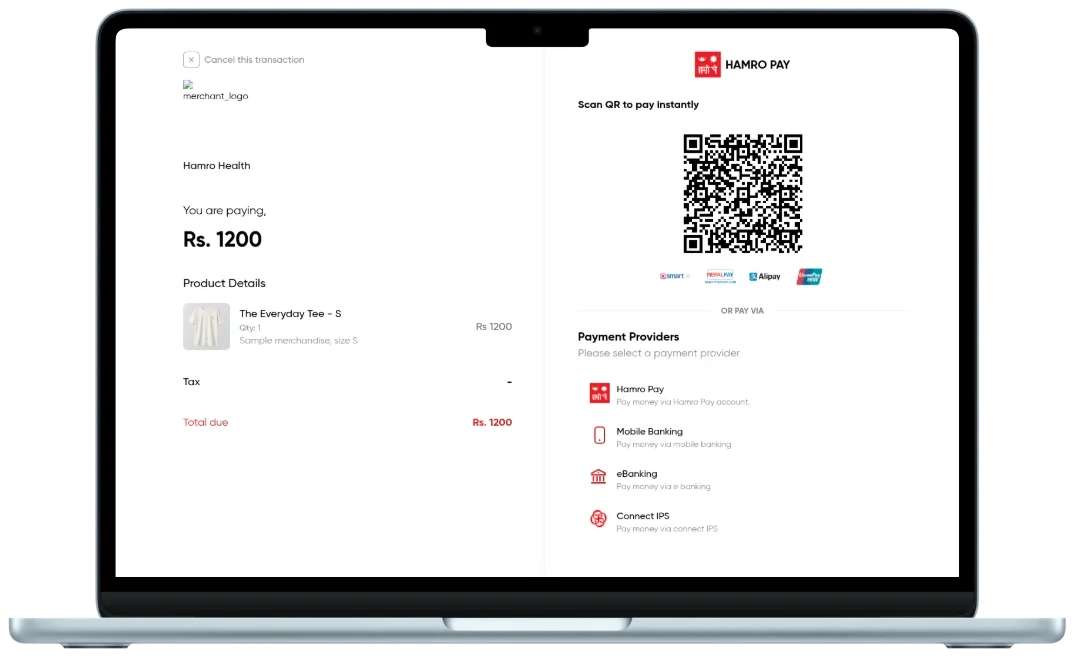
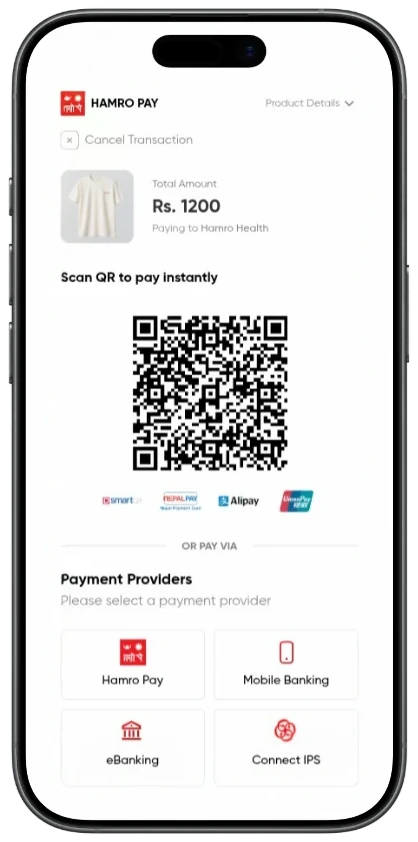
The checkout API is intent for the web to call. After the Session creation, the client’s website can make a request with Checkout-Form to hamro pay-checkout-gateway. This request has a Checkout-Form where Params need to be sent to hamropay checkout gateway. This will redirect you to hamropay checkout webpage with given params in form data.
Intended API User: Merchant frontend
Request body ( Form Data) :
Params :
The params of Checkout-Form, also known as body of request contains merchant_id, session_id, Token, merchant_transaction_id, transaction_id and remarks.
Fields for token generation: 1. merchant_id
2. merchant_transaction_id
3. session_id
4. transaction_amount
5. client_id
6. client_api_key
Use these fields for signature string generation i.e values of the fields combined with ',' to form a single string and see Signature Generation section to see how to generate this.
Params for request body :
params = {
            merchant_id: "Your merchant id" ,
            session_id: "Session ID",
            token: "Your Token" ,
            merchant_transaction_id: "Your Transaction ID (length less or equal to 25 chars)",
            remarks: " Remarks (upto 250 chars) ",
            phone_number: "phone number of hamropay user if available [OPTIONAL]"
          };
Js Sample Checkout-Form using params above
const form = document.createElement("form");
  form.method = method;
  form.action = path;
  form.enctype = "application/x-www-form-urlencoded";
  for (const key in params) {
    if (params.hasOwnProperty(key)) {
      const hiddenField = document.createElement("input");
      hiddenField.type = "hidden";
      hiddenField.id = key;
      hiddenField.name = key;
      hiddenField.value = params[key];
      form.appendChild(hiddenField);
    }
  }

  document.body.appendChild(form);
  form.submit();
Response after the request: Redirection to Hamro pay checkout gateway.
3.3. Get Transaction API
This API is used to get the transaction & its status after payment is made. The request header is the same as described in the Header section.
Intended API User: Merchant backend
Fields required for generating Signature string:
- merchantTxnId
- merchantId
- client_id
- clientApiKey
Use these fields for signature string generation i.e values of the fields combined with ',' to form a single string and see Signature Generation section to see how to generate this.
Generation process example:
initial_signature_string = merchantTxnId+','+merchantId+','+client_id+','+clientApiKey
final_signature_string = toBase64 ( HmacSHA512DigestOf(initial_signature_string, using_secret) )
Request :
| Fields | Data Type | Description |
|---|---|---|
| merchantId * | String | Unique id merchant |
| merchantTxnId * | String | Merchant Transaction ID from previous requests (Create Session) |
Response:
| Fields | Data Type | Description |
|---|---|---|
| merchantTransactionId | String | Merchant Transaction ID |
| status | String | Status of the transaction. (PENDING, PROCESSING, FAILED, COMPLETED) |
| amount | Double | Amount in Rupees. |
| remarks | String | Remarks of the transaction. |
| message | String | Message about the transaction. |
Request / Response Samples:
// Request
{
    "merchantId" : "PN_-Nd99TBnAlBjCgl8ef_b",
    "merchantTxnId" : "erftycnmiim"
}

// Response
{
    "merchantTransactionId": "erftycnmiim",
    "trackingId": "",
    "status": "NOT_INITIATED",
    "amount": 0,
    "remarks": "",
    "message": "TRANSACTION NOT INITIATED YET"
}
Once the transaction is successful or failed, Hamropay provides the response of the transaction through the Client’s response url provided during Create Session API Or through the webhook . The response is sent to the provided response url after the transaction is successful/Failed.
4. Success / Failed Redirection
After the transaction, HamroPay will redirect to the provided success or failure URL.
Regarding the Success Redirection URL. If the URL provided is
https://something.com/success,
HamroPay will redirects to client appending the MerchantTxnId as below:
https://something.com/success?MerchantTxnId=123213Where, MerchantTxnId represents the actual transaction ID, which Client can utilize to confirm the transaction from their end.
Regarding the Failure Redirection URL. If the URL provided is
https://something.com/failure,
HamroPay will redirects to client appending the MerchantTxnId as below:
https://something.com/failure?MerchantTxnId=123213Where, MerchantTxnId represents the actual transaction ID, which Client can utilize to confirm the transaction from their end.
5. Webhook (Optional)
Merchants / Clients will receive a webhook to their provided POST REQUEST URL (endpoint) from hamro pay after the Checkout transaction is successful or failed. The webhook can be used to trigger the actual transaction without having to poll for the transaction status.
Using Hamro Pay webhook
- 1. Integration Setup: To begin, the client integrates their application with Hamro Pay's payment system. This involves providing a callback URL, typically a POST endpoint, where Hamro Pay will send webhook notifications which is a json body regarding payment details. Enter this URL in UAT Merchant Portal → Configuration → Webhook.
- 2. Webhook Configuration: Once the URL is saved in the UAT Merchant Portal, Hamro Pay sends payment webhook notifications to it whenever a payment status changes, such as success or failure.
- 3. Handling Webhook Requests: The client's server needs to implement an endpoint to receive and process webhook requests. This endpoint should be capable of handling POST requests and parsing the incoming data.
- 4. Processing Payment Status: Upon receiving a webhook notification, the client's server extracts relevant information from the payload, such as transaction ID, status, and any associated metadata.
- 5. Handling Success or Failure: Depending on the received status, the client's application can take appropriate actions. For instance, if the payment was successful, it can update the user's account or trigger a confirmation message. If the payment failed, it can initiate a refund process or notify the user about the issue.
- 6. Signature Verification (Optional but Recommended): To ensure the authenticity of webhook requests and prevent unauthorized access or tampering, HamroPay can include a signature along with the payload. The client's server then verifies this signature to confirm that the request indeed originates from HamroPay.
Webhook Body:
These are the json body fields you will receive in request from hamropay backend to your provided endpoint.
| Fields | Data Type | Description |
|---|---|---|
| merchantTxnId | String | MerchantTransactionId generated from client, can be used to fetch transaction with merchantId |
| merchantId | String | For Reconciliation purpose |
| amount | double | Transaction amount in Rs. |
| status | String | Status of the transaction. (PENDING,PROCESSING,FAILED,COMPLETED) |
| metadata | map<string,string> | Same Extra data returned, that you send while creating payment intent |
Json Representation
//HEADER
// Signature: <<Signature String generated from hamropay>>

{
  "merchantTxnId": "Txn Id used for reconciliation purposed initially from client",
  "merchantId": "your merchant Id",
  "amount": 9.99, //in Rs.
  "status": "COMPLETED OR FAILED" //either or,
  "metadata": {"field1":"fieldValue1","field2":"fieldValue2"}
}
Webhook Verification
You will get a webhook request containing the signature in the header. The signature string is available in
header in key Signature i.e
header.get("Signature"). The
{{merchantWebHookSigningSecret}}
is generated when you save your webhook URL in
UAT Merchant Portal → Configuration → Webhook.
{merchantWebHookSigningSecret} is only
used to validate the webhook request and for nothing else
//Use the following fields from the body, to generate the signature string:
// Seperated by commas
var signatureString = merchantTxnId +','+ merchantId +','+ status +','+ amount;

var signatureFromHeader = header.get("Signature");
var signatureGenFromBodyInBase64 = Base64( HMAC.signHMAC(signatureString , {{merchantWebHookSigningSecret}}) );

var isValid = signatureFromHeader.equals(signatureGenFromBodyInBase64);
You can Signature Generation to see code sample how to generate signature string using the fields merchantTxnId +','+ merchantId +','+ status +','+ amount
6. Code with Description
- OK OR ACTIVE = 0
- CANCELED = 1
- UNKNOWN = 2
- INVALID_ARGUMENT = 3
- TIME_OUT = 4
- NOT_FOUND OR SUSPENDED = 5
- ALREADY_EXISTS = 6
- PERMISSION_DENIED = 7
- LIMIT_EXCEEDED = 8
- FAILED_PRECONDITION = 9
- ABORTED = 10
- OUT_OF_RANGE = 11
- UNIMPLEMENTED = 12
- INTERNAL = 13
- UNAVAILABLE = 14
- DATA_LOSS = 15
- UNAUTHENTICATED = 16
Test your integration
Once you have wired up the endpoints above, run an end-to-end payment with the UAT test credentials and verify the success, failed, and pending flows.
Go to checkout integration testingCompany
Code of Conduct
Hamro Pay Support
Chat Support: (24x7)
Call support: (6am-10pm)
Grievance officer
Follow Us


© 2026 HamroPay. All Rights Reserved.